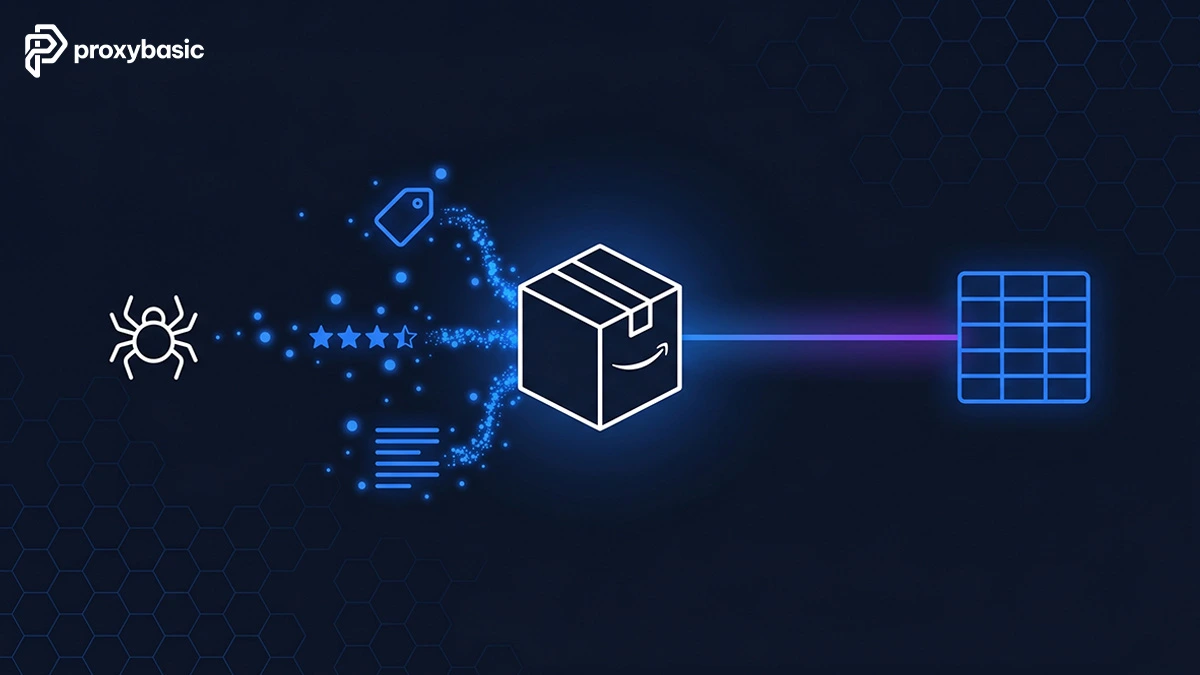
Amazon scraping gives you direct access to millions of live product listings, daily price changes, customer ratings, and review data across the world’s largest marketplace. Whether you need to track a competitor’s pricing, identify trending products in a category, or feed market data into a business intelligence tool, automating collection is the only practical path above a few dozen products.
Getting that data at scale takes more than a basic script. Amazon runs strict detection systems that block plain HTTP requests within minutes, so your setup, from proxy type to request pacing, determines whether your scraper runs for hours or gets cut off after ten pages. This guide covers every layer of the process: Python basics, rotating proxy setups, the right tools for each project size, and the legal lines you need to keep in mind.
Amazon Web Scraping: What It Is and Why Businesses Use It
Amazon web scraping is the automated process of sending HTTP requests to Amazon’s servers, parsing the returned HTML, and converting product data into structured formats like CSV or JSON for analysis or storage.
Technically, a scraper mimics a browser by requesting a product or search page, reading the HTML structure, and pulling out specific data fields: titles, ASINs, prices, ratings, review counts, availability, and seller information. Once collected, this data can feed pricing dashboards, product research tools, or any database that needs accurate market information.
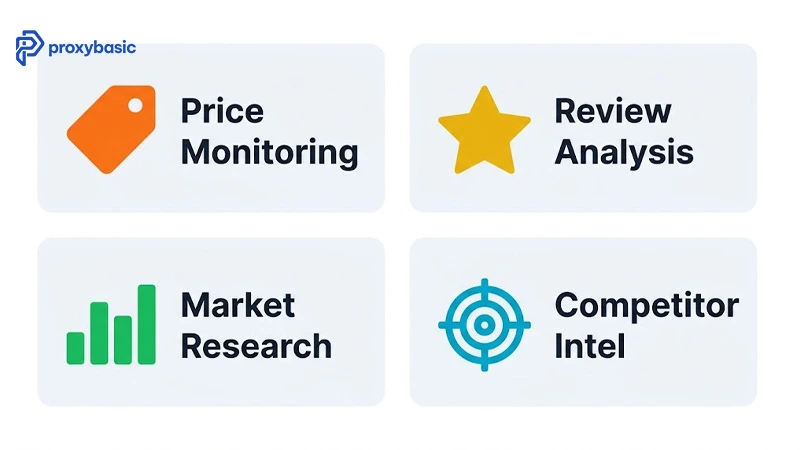
The four core business applications are price monitoring (tracking competitor price moves in real time), product research (spotting bestsellers and gaps in a category), review analysis (reading customer sentiment across thousands of listings), and competitive intelligence (benchmarking your own listings against rival products).
Amazon holds over 350 million product listings as of 2025, covering nearly every retail category. Pulling even a fraction of that data manually is impossible at business speed, which is why automated scraping has become a standard tool for e-commerce teams, price comparison platforms, and data analytics providers.
Transparent vs Elite Proxy Methods: Performance, Cost, and Scale
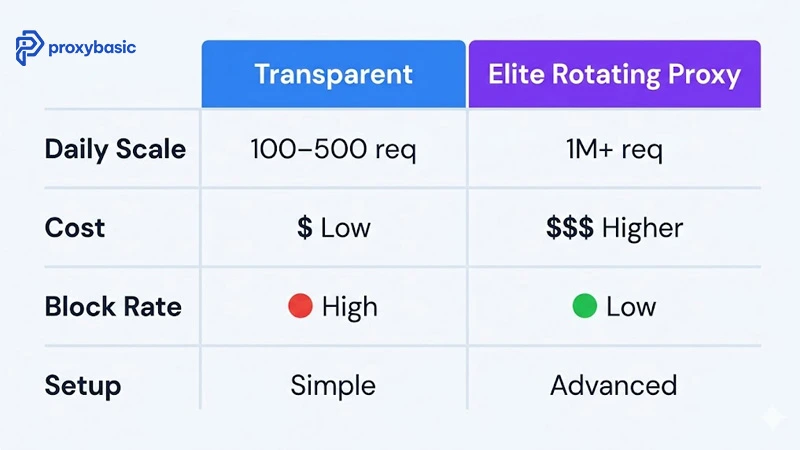
Two approaches handle scraping Amazon at different levels: transparent methods use clean browser headers to reduce detection, while elite methods route each request through a different residential IP address to distribute traffic across thousands of real-world connections.
The practical difference is volume. Transparent scraping handles up to 500 daily requests before Amazon’s rate limiter blocks the IP. Elite rotating proxy setups run millions of monthly requests with consistent success rates above 95%.
Basic Scraping Without Proxies
Basic scraping works by attaching HTTP headers to your requests, primarily User-Agent, Accept-Language, and Referer, so your traffic resembles a real browser session. No infrastructure is needed, and setup takes under an hour.
Without headers, Amazon returns 503 errors almost immediately. With proper headers, you can collect a few hundred pages per day before IP rate-limiting activates. This approach fits one-time research tasks, testing environments, or low-volume monitoring where you check a small set of products once per day.
The ceiling is real: run the same IP against Amazon’s search pages more than a few hundred times in a day and the IP gets blocked, sometimes temporarily, sometimes permanently. For anything beyond light personal use, transparent scraping alone is not a stable long-term setup.
Rotating Proxies for Large-Scale Operations
Rotating residential proxies route each outgoing request through a different IP address drawn from a pool of real home internet connections. Because each request looks like a separate household visiting Amazon, the detection system cannot identify a pattern tied to a single source.
Providers such as Bright Data (150M+ IPs), Smartproxy (55M IPs), and Crawlbase (60M+ IPs) maintain pools specifically suited for high-volume e-commerce scraping. Rotation happens automatically per request or per session depending on your configuration, and CAPTCHA handling is built into higher-tier plans.
At this scale, continuous scraping across entire product categories becomes manageable. The cost runs from $2 to $15 per GB depending on the provider and your monthly volume, but the data you collect from a single competitive pricing run typically justifies the spend many times over.
Amazon vs Google: Different Defenses, Different Tactics
Amazon and Google each protect against scrapers in different ways. Amazon focuses on IP rate limits and session pattern tracking: the same IP requesting the same page type too quickly triggers a block. Google focuses on browser fingerprinting, checking whether the client executes JavaScript, moves a mouse, and behaves like a real Chrome user.
For Amazon, residential IP rotation is the primary countermeasure. For Google, a headless browser with realistic timing matters more than IP variety. If you run scrapers against both platforms, build separate proxy configurations for each rather than applying the same setup to both.
How to Extract Amazon Product Data: A Step-by-Step Process
Extracting Amazon data follows four stages: map the target elements in the HTML, write the fetch-and-parse script, add blocking countermeasures, then export to a usable format.
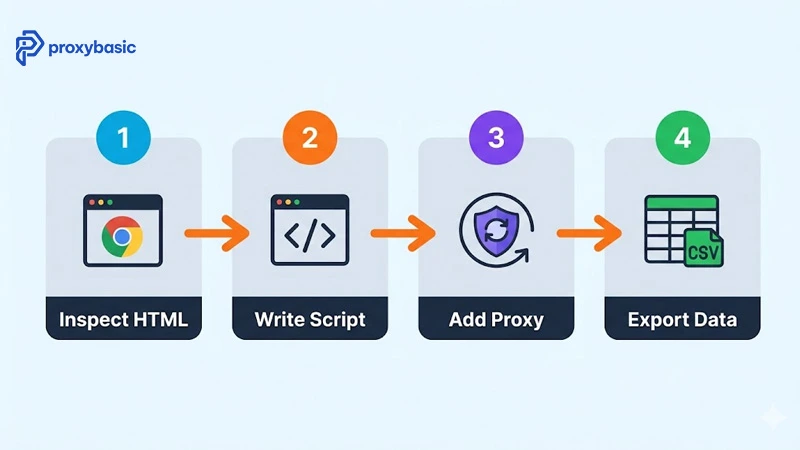
Prompt: Bright flat-design horizontal step-flow illustration on light sky-blue (#f0f9ff) background. Four stages, each in a rounded rectangle card: Stage 1 teal (#0ea5e9) numbered circle “1” above card, browser DevTools icon, dark label “Inspect HTML”. Stage 2 orange (#f97316) numbered circle “2”, code-bracket icon, dark label “Write Script”. Stage 3 purple (#7c3aed) numbered circle “3”, shield-with-rotate icon, dark label “Add Proxy”. Stage 4 green (#22c55e) numbered circle “4”, table/CSV icon, dark label “Export Data”. Cards connected by bold orange (#f97316) horizontal arrows. Light gray (#e2e8f0) card backgrounds. 16:9, 1200×630px, PNG. Color palette: light blue #f0f9ff, teal #0ea5e9, orange #f97316, purple #7c3aed, green #22c55e, dark #1e293b.
Identifying Target Data Points
Open Amazon in your browser and press F12 to open DevTools. Switch to the Elements tab and hover over each piece of data you need to find its CSS selector.
Product titles typically sit inside .a-size-mini or .a-size-base-plus. Prices split into two spans: .a-price-whole holds the integer portion and .a-price-fraction holds the cents. Ratings appear in .a-icon-star-small. ASIN values appear in the data-asin attribute on each product container div.
Write every selector into a reference file before writing code. Amazon updates its HTML structure several times each year, and having selectors documented reduces fix time from hours to minutes when a layout change breaks your scraper.
Setting Up Your Python Scraper
Install the two core libraries and build a minimal fetch-and-parse script:
pip install requests beautifulsoup4
import requests
from bs4 import BeautifulSoup

headers = {
    'User-Agent': 'Mozilla/5.0 (Windows NT 10.0; Win64; x64) AppleWebKit/537.36',
    'Accept-Language': 'en-US,en;q=0.9'
}

url = "https://www.amazon.com/s?k=laptop"
response = requests.get(url, headers=headers)
soup = BeautifulSoup(response.content, 'html.parser')

for product in soup.find_all('div', {'data-component-type': 's-search-result'}):
    title = product.find('h2', {'class': 'a-size-mini'})
    price = product.find('span', {'class': 'a-price-whole'})
    if title and price:
        print(f"Title: {title.text.strip()}, Price: ${price.text.strip()}")
For pages where product data loads through JavaScript (infinite-scroll review sections, dynamic pricing), switch to Playwright. Playwright renders the full page before parsing, which captures data that BeautifulSoup cannot read from static HTML. The trade-off is slower execution and higher memory use, so only switch when your static scraper returns empty fields.
Handling CAPTCHAs, Rate Limits, and Blocks
Add time.sleep(2) between requests to keep your request rate below Amazon’s detection threshold. Rotate your User-Agent string across a short list of five to ten real browser versions per session. Keep session cookies consistent within a single browsing flow to avoid triggering anomaly detection tied to cookie changes.
For CAPTCHA challenges at scale, two paths work reliably: use a proxy service that handles CAPTCHA solving in its infrastructure (Crawlbase Smart Proxy does this automatically), or connect a solving service like 2Captcha, pass the solved token back into the session, and continue from the blocked page.
Exporting to CSV, JSON, or Database
import csv, json

products = [
    {'title': 'Laptop A', 'price': '899', 'rating': '4.5'},
    # ... more rows
]

# CSV export
with open('amazon_products.csv', 'w', newline='') as f:
    writer = csv.DictWriter(f, fieldnames=['title', 'price', 'rating'])
    writer.writeheader()
    writer.writerows(products)

# JSON export
with open('amazon_products.json', 'w') as f:
    json.dump(products, f, indent=2)
CSV works best for one-time spreadsheet analysis. JSON fits API integrations and data pipelines. For ongoing price monitoring, store results in SQLite or PostgreSQL so you can query price trends over time rather than re-scanning old flat files.
Best Tools for Amazon Scraping in 2025
Three tool categories cover every scale and budget for Amazon scraping projects, from personal research to enterprise data pipelines pulling millions of records per month.
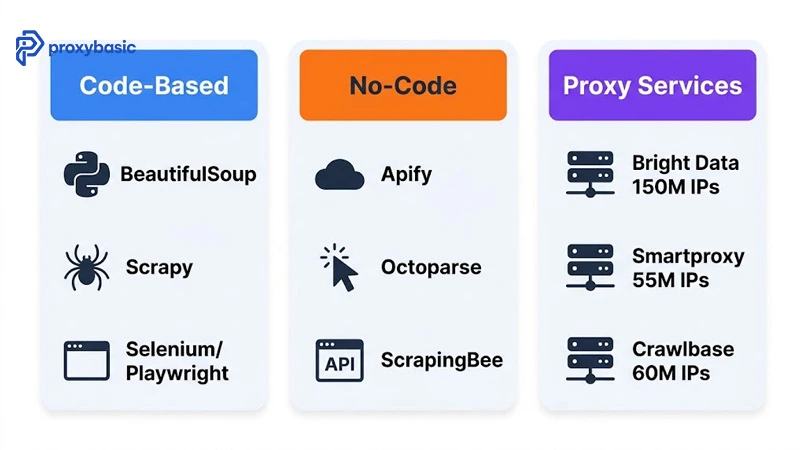
Prompt: Bright flat-design three-column infographic on white (#ffffff) background. Column 1 header card in blue (#3b82f6) “Code-Based”, below: Python logo icon labeled “BeautifulSoup”, spider icon labeled “Scrapy”, browser icon labeled “Selenium/Playwright”. Column 2 header card in orange (#f97316) “No-Code”, below: cloud icon labeled “Apify”, cursor icon labeled “Octoparse”, API icon labeled “ScrapingBee”. Column 3 header card in purple (#7c3aed) “Proxy Services”, below: server icons labeled “Bright Data 150M IPs”, “Smartproxy 55M IPs”, “Crawlbase 60M IPs”. Each column is a rounded card with light (#f8fafc) inner background, colored header. Bold dark (#1e293b) text throughout. 16:9, 1200×630px, PNG. Color palette: white #ffffff, blue #3b82f6, orange #f97316, purple #7c3aed, light #f8fafc, dark #1e293b.
Code-Based Solutions: BeautifulSoup, Scrapy, Selenium
BeautifulSoup parses static HTML quickly using only the requests library alongside it. Scrapy builds full production crawlers with built-in request queuing, middleware support, and data pipeline management, making it the right choice when you need to crawl entire product categories on a schedule. Playwright and Selenium automate a real browser, which is needed when Amazon loads product data through JavaScript calls that BeautifulSoup never sees.
Code-based tools run at near-zero cost once you have a proxy service, but they require Python knowledge and regular maintenance when Amazon changes its HTML structure.
No-Code Platforms: Apify, Octoparse, ScrapingBee
Apify hosts pre-built Amazon scrapers on a cloud platform. Configure a few settings, set a schedule, and download results without writing code. Octoparse uses a visual point-and-click interface to build workflows against any website structure. ScrapingBee reduces your integration to a single API call that handles proxy rotation and CAPTCHA solving on its end.
These platforms cost more per request (typically $0.001 to $0.01 per page) but cut setup time from days to hours and remove infrastructure maintenance from your team’s plate entirely.
Residential Proxy Services: Bright Data, Smartproxy, Crawlbase
The table below compares the three leading residential proxy services by the metrics that matter most for scraping Amazon at scale:
| Provider | Pool Size | Price/GB | CAPTCHA Handling | Best For |
|---|---|---|---|---|
| Bright Data | 150M+ IPs | $3.00 | Yes (add-on) | Enterprise scale |
| Smartproxy | 55M IPs | $2.00 | Partial | Mid-volume |
| Crawlbase | 60M+ IPs | ~$3.50 | Built-in | Amazon-focused |
Crawlbase’s Smart Proxy is built specifically for e-commerce targets and handles CAPTCHA challenges automatically without extra configuration. Bright Data leads on pool size and uptime (99.99%) for operations that need geographic targeting across multiple Amazon marketplaces. Smartproxy offers the best entry price for teams scaling from a few thousand to a few hundred thousand monthly requests.
Legal and Ethical Rules for Amazon Scraping
Scraping Amazon public data, including product titles, prices, ratings, and review counts, is legally defensible under fair use in most jurisdictions, but Amazon’s Terms of Service explicitly prohibit automated access without prior written permission.
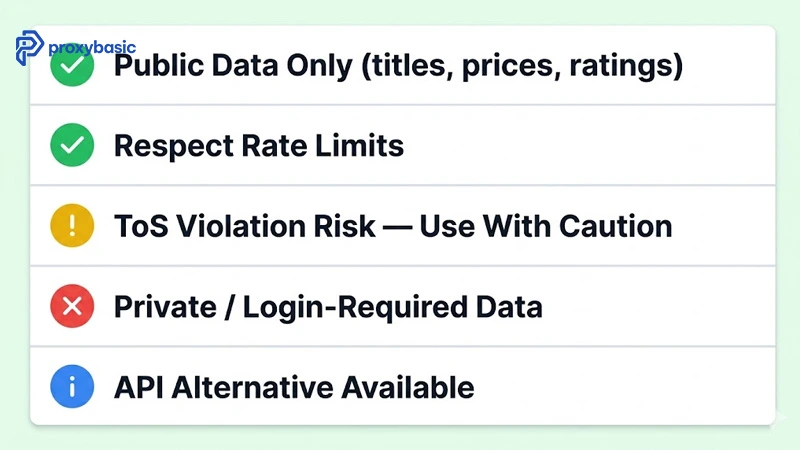
Prompt: Bright flat-design vertical checklist illustration on light green (#f0fdf4) background. Five checklist rows in a clean card layout, each with a colored circle icon on the left and bold dark (#1e293b) label: Row 1: green (#22c55e) check circle “Public Data Only (titles, prices, ratings)”. Row 2: green (#22c55e) check circle “Respect Rate Limits”. Row 3: yellow (#eab308) warning circle “ToS Violation Risk — Use With Caution”. Row 4: red (#ef4444) X circle “Private / Login-Required Data”. Row 5: blue (#3b82f6) info circle “API Alternative Available”. Soft card shadows, clean dividers in light gray (#e2e8f0) between rows. 16:9, 1200×630px, PNG. Color palette: light green #f0fdf4, green #22c55e, yellow #eab308, red #ef4444, blue #3b82f6, dark #1e293b.
The legal picture breaks into two separate questions. The first is data law: scraping publicly visible prices and product names generally falls within fair use and aligns with the direction of court decisions including hiQ Labs v. LinkedIn, which held that scraping publicly accessible data does not violate computer access laws. The second is contract law: Amazon’s ToS creates a contract between you and Amazon, and breaking it can lead to account suspension, IP blocks, or legal action for breach of contract.
Four rules keep your operation on solid ground:
- Scrape only data visible to any logged-out visitor (titles, prices, review counts, ratings)
- Keep request rates low enough to avoid putting load on Amazon’s infrastructure
- Do not republish scraped data as an original proprietary dataset or resell it as such
- Check Amazon’s Product Advertising API before building a scraper — it gives legal access to product data with defined rate limits and covers many standard use cases at no cost up to 8,640 daily requests
For large-scale commercial operations, the PA API is worth evaluating first. If your data needs go beyond what the API provides, document your use case and keep your scraping within the boundaries of publicly available data only.
Conclusion: Match Your Tools to Your Scale
Amazon scraping comes down to one decision: match your proxy setup to your request volume. Under 500 daily requests, BeautifulSoup with proper headers gets the job done. Past that, rotating residential proxies keep your scraper running where a basic IP gets cut off in minutes. Pick the right layer from the start and you avoid rebuilding mid-project.
The data is out there, publicly visible, updated daily. The only thing between you and it is the right infrastructure. Get your proxy layer sorted at ProxyBasic and your first run will tell you more about your competitors’ pricing than a month of manual research.